By admin
From BPC to SAC Planning

Published by Liquid Peak Consulting | SAP Planning & Analytics Experts
The Shift: Why Organizations Are Moving from BPC to SAC
As financial planning cycles become shorter and more dynamic, many organizations are realizing that legacy tools like SAP BPC (Business Planning and Consolidation) no longer offer the flexibility or speed required for modern enterprise performance management.
Enter SAP Analytics Cloud (SAC) Planning—a unified platform for planning, forecasting, reporting, and analytics, all in the cloud.
This article explores the key benefits of moving to SAC Planning, outlines the challenges to watch for, and provides a step-by-step guide to help your business plan a smooth and strategic migration.
Why Move to SAP Analytics Cloud for Planning?
SAC Planning isn’t just an upgrade—it’s a fundamentally new approach that combines analytics and planning in one system. Here’s what makes it compelling:
✅ Unified Platform
SAC combines planning, BI, and predictive analytics into a single interface. No more toggling between tools or reconciling numbers across systems.
✅ Real-Time Data Access
With live connections to SAP S/4HANA, BW/4HANA, and Datasphere, users access up-to-date data instantly—reducing lag and improving decision-making accuracy.
✅ Cloud Scalability
Unlike BPC, SAC is a cloud-native solution, offering faster updates, lower infrastructure costs, and more agile deployment models.
✅ Collaborative Planning
SAC allows multiple stakeholders to participate in the planning process simultaneously, with audit trails, role-based access, and in-app comments.
✅ Built-in Intelligence
From predictive forecasting to machine learning insights, SAC helps finance teams shift from static budgeting to dynamic, driver-based planning.
What Makes the Transition Complex?
Despite the benefits, moving from BPC to SAC Planning is not plug-and-play. Here are some common challenges we’ve seen:
❌ Data Model Mismatch
BPC uses embedded or standard models, while SAC introduces a new planning model structure. Mapping these effectively is critical for success.
❌ Custom Logic Migration
BPC scripts, ABAP routines, and logic-based validations need to be rewritten or reimagined in SAC’s scripting environment or through advanced formulas.
❌ Change Management Gaps
Finance teams often have years of experience in BPC. Without proper training, SAC’s new interface and workflow can lead to frustration and resistance.
❌ Underestimating Integration
SAC works best with clean, structured master and transactional data. Migrating without cleansing data or aligning with SAC’s data model leads to poor performance.
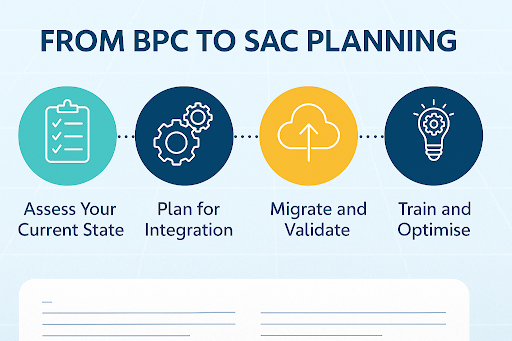
6 Steps to a Smooth BPC to SAC Planning Migration
1. Assess Your Current BPC Setup
Start with a clear inventory:
- What models, reports, and workflows exist?
- What custom logic is in place?
- Which pain points do users currently face?
This helps distinguish what to carry over, what to redesign, and what to eliminate.
2. Define the Future State in SAC
Don’t aim for a like-for-like rebuild. Use this transition to rethink planning processes. Where can you:
- Introduce rolling forecasts?
- Reduce manual entries?
- Shift from cost-center to driver-based planning?
Document a clear SAC planning model based on your future needs, not just past habits.
3. Design and Build Your SAC Model
Build the data model in SAC:
- Define dimensions (e.g., version, time, cost center)
- Set up hierarchies and attributes
- Develop formulas and input-ready fields
- Configure user roles and permissions
Ensure it aligns with your integration and reporting strategy.
4. Integrate with Source Systems
Connect SAC to:
- SAP S/4HANA or BW/4HANA for live or imported data
- HR, CRM, or other planning drivers if needed
Consider SAP Datasphere or BTP for advanced integration scenarios.
5. Run Parallel Cycles
Before go-live, run at least one full parallel planning cycle in SAC. Compare outputs to your existing BPC system to test accuracy, performance, and usability.
Use this cycle to train key users and gather feedback.
6. Decommission and Go Live
Once you’re confident in SAC’s performance and your teams are onboard, sunset BPC models in phases. Plan a post-go-live support period to manage change requests, bug fixes, and training refreshers.
Results You Can Expect
Companies that successfully move from BPC to SAC Planning typically report:
- Faster planning cycles
- Greater user collaboration
- Improved data transparency
- Fewer offline spreadsheets
- Better forecast accuracy through AI and predictive tools
Final Thought: Don’t Just Migrate—Modernize
The move from BPC to SAC Planning is more than a system change. It’s a chance to rethink your planning strategy, align it with real-time business data, and empower your teams to plan smarter.
At Liquid Peak, we specialize in guiding organizations through this transition—simplifying the migration while unlocking the full potential of SAC.
Thinking About Moving to SAC Planning?
We can help you assess your readiness, design your future-state model, and deliver a migration roadmap aligned with your business goals.